Guides
What matters most in livestream creator production workflow
A livestream production workflow holds up when it captures the stream, the sponsor and the viewer at the same time, on a schedule the rig can carry.
What to take away
- Log every sponsored segment at intake. The recording alone does not prove what ran.
- Schedule around the streaming rig, not around the calendar. Encoder load, upload bandwidth and capture storage set the real ceiling on how many streams a week you can run.
- Close every sponsored stream with the viewer and the sponsor both present or informed, and log what changed on air.
- Price the deal so it covers production cost before it covers your time. A flat fee that ignores encoder hours and editing is a loss with a logo on it.
- Read the contract's exclusivity, morality and kill clauses before you sign, and confirm the current rules with the FTC, a CPA or a licensed attorney in your state.
This article covers creator-business operations in general. It is not advertising, tax, contract or legal advice. Platform terms, endorsement rules and tax treatment depend on your platform, audience, sponsor and state, so check the current published terms and use qualified professional guidance for material deals.
What intake actually captures
A livestream does not have a deliverable list the way a pre-recorded campaign does. The stream leaves one master file, and every clip, thumbnail and sponsor proof point is cut from it.
Intake Capture Checklist
- Confirm local recording is running
- Confirm VOD will publish
- Confirm where the file lands
- Log sponsor read timestamp and duration
- Log what the host said
Run local recording in OBS Studio, Streamlabs Desktop or Ecamm Live. Keep a backup capture on a second machine running OBS, or use a hardware recorder such as an Atomos Ninja. Log timestamps in a Google Sheet or Excel workbook, with columns for timecode, sponsor, duration and notes.
A usable log line looks like: 01:14:22, Sponsor A, 45 seconds, host held up the blue bottle, read approved script, no changes. That log is the proof you send the sponsor, and it is the record of what actually aired.
Schedule around the rig, not the calendar
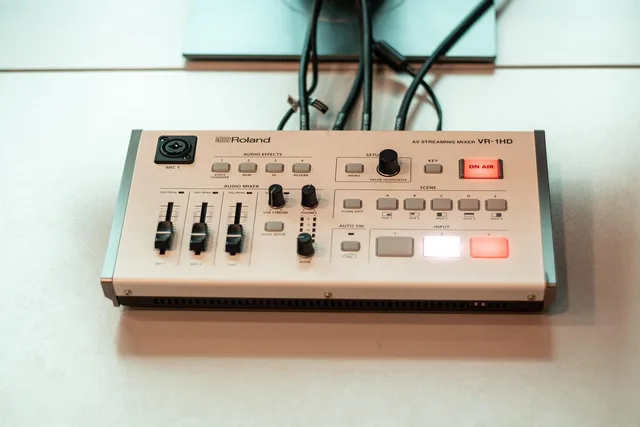
A content calendar built on ideas rather than capacity is a wish list. The constraint is the streaming rig: encoder load, upload bandwidth, capture storage and the hours a host can stay sharp on camera.
Rig Capacity Calculation
- Start with stream hours per week
- Subtract setup, teardown, editing hours
- Divide by sponsored segments per stream
- Result is real deal capacity
Here is a worked example. A host streams 12 hours a week. Setup and teardown cost 3 hours, editing costs 4, so 5 hours remain.
Each sponsored stream carries 2 paid segments and needs 2.5 hours of production overhead. That allows 2 sponsored streams per week, or 4 paid segments. A third stream pushes past the ceiling unless the host cuts another stream or shortens the edit.
Build the schedule from that ceiling, then fill it. The livestream creator content calendar is where those hours get assigned, and it should change when the rig changes, not when a sponsor asks for a date.
Close with the viewer and the sponsor present
The end of a sponsored stream is a handoff, not a fade-out. The viewer needs to know what they just watched and whether it was paid for. The sponsor needs to know what ran and whether it matched the agreement.
Close-Out Checklist
- Say disclosure out loud during the read
- Record any segment that ran short
- Note any product that did not arrive
- Log any claim the host softened
Say the disclosure out loud during the read, not only in the description. The FTC endorsement guides require a clear and conspicuous disclosure of material connections, and the advertising FAQs for small business apply the same truthfulness standard to claims made on stream.
If you ask viewers for reviews afterward, the guide on soliciting and paying for online reviews sets out what you cannot do.
Before you close the stream, record anything that changed: a segment that ran short, a product that did not arrive, a claim the host softened. Note it while it is fresh. Reconstructing a stream from memory a week later is how disputes start.
Publish, clip and deliver proof
Publish the VOD first, with the disclosure still in the description and the sponsor read left in. Then cut clips. Pull the three strongest moments from the stream log, export vertical and horizontal versions, and make thumbnails that show the host and the product without a misleading promise.
Deliver sponsor proof in one folder: the VOD link, the clip links, the thumbnail files, and the stream log with timecodes. Send it within 48 hours of the stream. Late proof delays payment and invites a dispute about what ran.
The rig checklist before every sponsored stream
- Local recording armed and writing to disk with headroom left
- Upload bandwidth tested at the bitrate you plan to stream
- Sponsor read scripted, timed and approved in writing
- Disclosure line written into the run of show
- Stream log open for timestamps and changes
- Backup capture running on a second machine or service
Run it before every paid stream. The production setup checklist covers the hardware side in more depth, but the six items above are the ones that lose money when they are skipped.
How the day runs, in order
How the day runs
- Confirm local recording and backup capture are running before the countdown.
- Check the sponsor read and disclosure line against the approved script before the countdown.
- Brief the crew on scope, access and the finish line before the countdown.
- Close the stream with the viewer and sponsor present or informed, and record anything that changed.
- Review the week for the stream that ran long, and change the intake or the schedule, not the crew.
Common questions
Why capture the stream at intake instead of after?
Because the stream is the only copy. A failed local recording cannot be rebuilt from a VOD that was also lost, and clips, thumbnails and sponsor proof all depend on that one file. Confirm the recording is running before you go live.
How many sponsored streams can one host carry?
Your ceiling is the number you can deliver without breaking the edit or the on-camera read. The worked example in the scheduling section shows one host at 2 sponsored streams a week. Test your own count for a month before you promise it to a sponsor.
What has to be disclosed during a paid stream?
Any material connection between you and the sponsor, clearly and conspicuously, in the stream itself and not only in the description. The FTC endorsement guides set the standard, and the sponsor's written offer should state what they expect you to say.
When should a creator bring in a professional?
Before signing anything with exclusivity, morality or kill clauses, and before treating sponsorship income as settled. A CPA and a licensed attorney in your state can read the contract and the tax position; this article cannot.